






Some links on this page are partner links. They never change what we recommend. How we pick →
Submagic Review 2027: AI Captions for Shorts, Worth It?
Drop in a talking video, get back animated captions, zooms, B-roll and sound effects in about a minute. Here's what each plan really covers, in videos per month, and how to test it.
Gear Receipts Desk· 7 sources read· Updated Nov 27, 2026
Yes, Submagic is worth it if you post short videos every week and captions do the heavy lifting. Submagic adds animated, word-level captions in 118 languages, plus zooms, B-roll, sound effects and silence removal, and Magic Clips cuts long videos into shorts. Plans start at $19 a month (US list price), with no watermark, and you can try it free without a card.
Try it free, no credit card. Black Friday: up to 60% off yearly plans, price locked while you stay subscribed.Jump to a section
Starter plan, US list price ($144 a year), 15 captioned videos a month
Receipt · Submagic pricing page$19/mo Starter plan, US list price ($144 a year), 15 captioned videos a monthRead Nov 27, 2026Open source ↗Caption languages, 98.8% average accuracy on clear audio
Receipt · Submagic Magic Clips page118 Caption languages, 98.8% average accuracy on clear audioRead Nov 27, 2026Open source ↗Longest video Magic Clips accepts, on every plan
Receipt · Submagic pricing page3 hours Longest video Magic Clips accepts, on every planRead Nov 27, 2026Open source ↗Trustpilot score from 867 reviews (Nov 26, 2026)
Receipt · Submagic on Trustpilot4.5/5 Trustpilot score from 867 reviews (Nov 26, 2026)Read Nov 27, 2026Open source ↗Is Submagic worth it in 2027?
Short version: if you make TikToks, Reels or YouTube Shorts with someone talking on camera, Submagic is one of the fastest ways to make them look edited. You upload the clip, pick a caption style, and get back word-by-word animated captions with emojis, zooms, B-roll, sound effects and the silences cut out. Receipt · Submagic home pageAnimated captions in 118 languages, B-roll, zooms, sound effects, silence removal, web and iOS appRead Nov 27, 2026Open source ↗
Captions matter on short video because a lot of people scroll with the sound off. Submagic was built around that one job, and it shows in the details: a custom dictionary for your niche words, and words the AI isn't sure about highlighted so you can check them before you export. Receipt · Submagic languages page118 languages, custom dictionary, low-confidence word highlightingRead Nov 27, 2026Open source ↗
It has grown past captions. Magic Clips turns a podcast or webinar into a batch of vertical shorts, and Iris, the AI edit, takes a raw video and returns a finished short you can tweak by chatting. Submagic says more than 4 million people use it. Receipt · Submagic pricing pagePlan features and limits, credits, videos per month, export quality, Magic Clips and Iris limits, Black Friday discounts, no credit card to try, 4 million usersRead Nov 27, 2026Open source ↗
Submagic is showing up to 60% off yearly plans: 35% on Starter, 50% on Pro and 60% on Business, with the price locked while you stay subscribed. The page doesn't show an end date, so check the live total at checkout.
No credit card to start. Upload a talking video and see the captions in a minute.
What does Submagic do?
Submagic runs in your browser (there's also an iOS app), so there's nothing to install. Here's what you get, according to Submagic's own pages. Receipt · Submagic home pageAnimated captions in 118 languages, B-roll, zooms, sound effects, silence removal, web and iOS appRead Nov 27, 2026Open source ↗
- Animated captions in 118 languages, with caption templates, emojis and highlighted keywords Receipt · Submagic home pageAnimated captions in 118 languages, B-roll, zooms, sound effects, silence removal, web and iOS appRead Nov 27, 2026Open source ↗
- Custom words dictionary so your brand and niche terms come out right every time Receipt · Submagic languages page118 languages, custom dictionary, low-confidence word highlightingRead Nov 27, 2026Open source ↗
- Auto zooms, B-roll and sound effects added for you Receipt · Submagic home pageAnimated captions in 118 languages, B-roll, zooms, sound effects, silence removal, web and iOS appRead Nov 27, 2026Open source ↗
- Silence and bad-take removal, plus text-based trimming: delete words in the transcript to cut the video Receipt · Submagic pricing pagePlan features and limits, credits, videos per month, export quality, Magic Clips and Iris limits, Black Friday discounts, no credit card to try, 4 million usersRead Nov 27, 2026Open source ↗
- Magic Clips: paste a YouTube link or upload a video up to 3 hours, get vertical clips reframed to 9:16 with the speaker kept in frame Receipt · Submagic Magic Clips pageUp to 3-hour source, clip counts by length, clip lengths, virality score, 9:16 reframing, 98.8% accuracy in 118 languagesRead Nov 27, 2026Open source ↗
- Iris, the AI edit: cuts, captions, zooms, B-roll, motion graphics, music and sound effects, with changes made by chat Receipt · Submagic for startups pageIris AI edit with chat revisions, AI AvatarRead Nov 27, 2026Open source ↗
- AI Avatar: turn a script into a faceless video with an AI presenter Receipt · Submagic for startups pageIris AI edit with chat revisions, AI AvatarRead Nov 27, 2026Open source ↗
- Publishing and analytics for your social accounts (Pro and up) Receipt · Submagic pricing pagePlan features and limits, credits, videos per month, export quality, Magic Clips and Iris limits, Black Friday discounts, no credit card to try, 4 million usersRead Nov 27, 2026Open source ↗
How good is Submagic's Magic Clips?
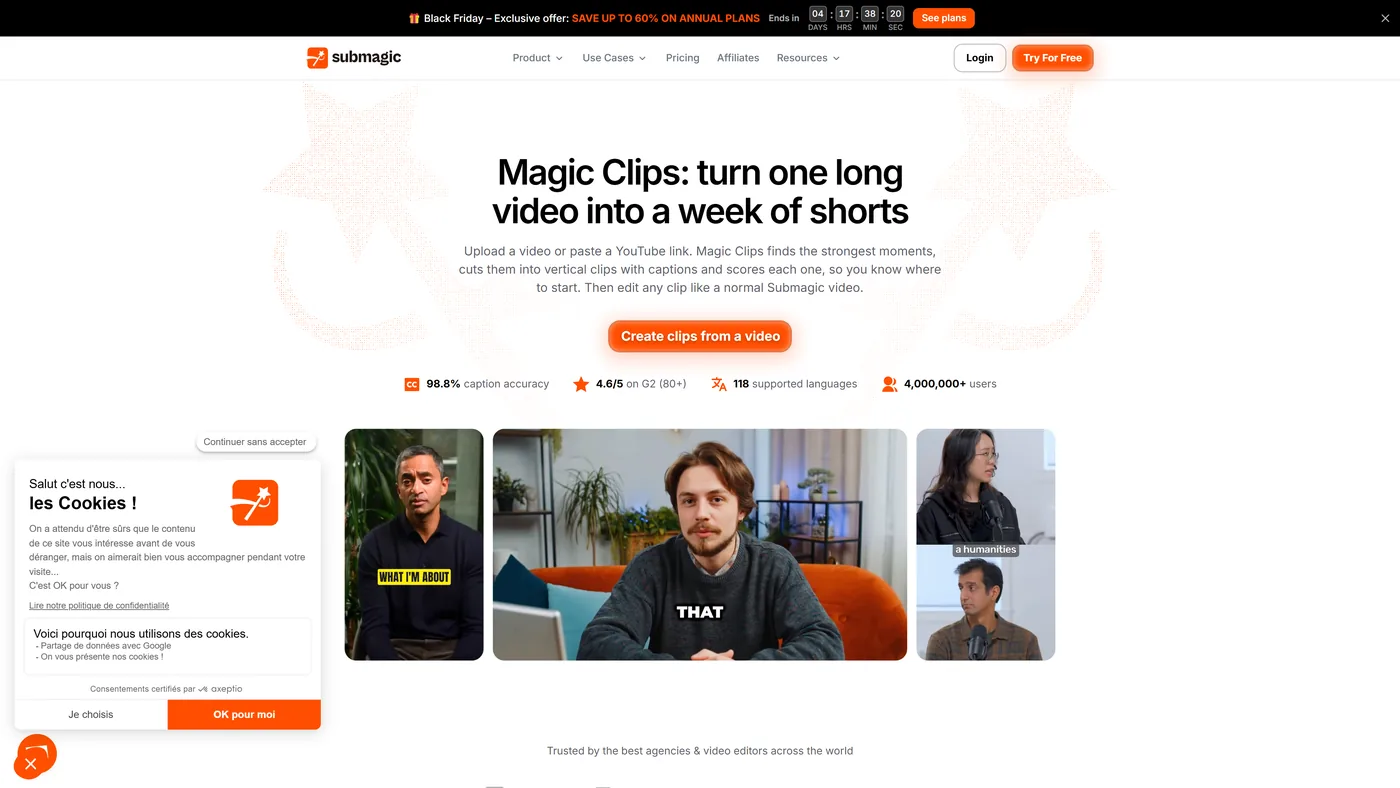
Magic Clips reads the transcript of your long video and looks for moments with a strong opening, a complete thought and a reason to share. Each one becomes its own short with your caption style and a title. Receipt · Submagic Magic Clips pageUp to 3-hour source, clip counts by length, clip lengths, virality score, 9:16 reframing, 98.8% accuracy in 118 languagesRead Nov 27, 2026Open source ↗
| Source video length | Clips the AI aims for |
|---|---|
| 3 minutes or less | About 6 |
| Up to 5 minutes | About 10 |
| Up to 10 minutes | About 20 |
| Up to 30 minutes | About 25 |
| Longer, up to 3 hours | About 30 |
Receipt · Submagic Magic Clips pageUp to 3-hour source, clip counts by length, clip lengths, virality score, 9:16 reframing, 98.8% accuracy in 118 languagesRead Nov 27, 2026Open source ↗
You choose the clip length (auto from 15 to 80 seconds, or under 30, 30 to 59, or 60 to 89 seconds). Each clip gets a virality score split into hook, emotion, story and shareability. Submagic is clear that it's an estimate, not a promise of views: use it to decide which clips to review first. Receipt · Submagic Magic Clips pageUp to 3-hour source, clip counts by length, clip lengths, virality score, 9:16 reframing, 98.8% accuracy in 118 languagesRead Nov 27, 2026Open source ↗
If clipping long videos is your main job rather than captions, compare it with the dedicated tools in our OpusClip review and our roundup of the best AI clip generators.
How much does Submagic cost?
Three plans, each billed monthly or yearly. The prices below are the US dollar list prices Submagic publishes for its pricing page, read on November 27, 2026. Submagic shows local currency in some countries, so your checkout may differ. Receipt · Submagic pricing pagePlan features and limits, credits, videos per month, export quality, Magic Clips and Iris limits, Black Friday discounts, no credit card to try, 4 million usersRead Nov 27, 2026Open source ↗
Trying short video, a few posts a week
- 45 credits a month: about 15 captioned videos
- Videos up to 2 minutes
- 1080p, 30 fps export
- No watermark
- 5 long videos clipped, 2 Iris edits a month
- Free B-roll and audio, text-based trimming
Creators who post every day or almost
- 120 credits a month: about 40 captioned videos
- Videos up to 5 minutes
- 2K, 30 fps export
- 15 long videos clipped, 6 Iris edits a month
- All caption templates, AI bad-take and silence removal, AI clean audio
- Storyblocks B-roll, Brand Kit, publishing and analytics
Agencies and teams
- 300 credits a month: about 100 captioned videos
- Videos up to 30 minutes
- 4K, 60 fps export
- 37 long videos clipped, 15 Iris edits a month
- 30 custom templates, API (100 min a month)
- Priority support and rendering, 3 social accounts per platform
| Starter | Pro | Business | |
|---|---|---|---|
| Monthly | $19 | $39 | $69 |
| Yearly | $144 | $276 | $492 |
| Captioned videos a month | 15 | 40 | 100 |
| Max length per video | 2 min | 5 min | 30 min |
| Export | 1080p, 30 fps | 2K, 30 fps | 4K, 60 fps |
| Magic Clips (long videos a month) | 5 | 15 | 37 |
| Iris AI edits a month | 2 | 6 | 15 |
| Black Friday on yearly (Nov 27, 2026) | 35% off | 50% off | 60% off |
Receipt · Submagic pricing pagePlan features and limits, credits, videos per month, export quality, Magic Clips and Iris limits, Black Friday discounts, no credit card to try, 4 million usersRead Nov 27, 2026Open source ↗ Receipt · Submagic pricing page, USD price dataUS dollar prices published by Submagic: Starter $19/mo or $144/yr, Pro $39/mo or $276/yr, Business $69/mo or $492/yrRead Nov 27, 2026Open source ↗
Count your shorts. Under 15 a month and all under 2 minutes? Starter. Posting daily, or clipping a weekly podcast? Pro is the sweet spot: 40 videos, 5-minute clips, 2K and the AI silence and bad-take removal that saves the most time.
Up to 60% off yearly plans, kept while you stay subscribed.
How do you make your first short with Submagic?
-
1
Sign up free
No credit card needed to try it. Everything runs in the browser. Receipt · Submagic pricing pagePlan features and limits, credits, videos per month, export quality, Magic Clips and Iris limits, Black Friday discounts, no credit card to try, 4 million usersRead Nov 27, 2026Open source ↗
-
2
Upload a talking video
MP4 or MOV. For a long video, use Magic Clips and paste a YouTube link instead. Receipt · Submagic Magic Clips pageUp to 3-hour source, clip counts by length, clip lengths, virality score, 9:16 reframing, 98.8% accuracy in 118 languagesRead Nov 27, 2026Open source ↗
-
3
Pick a caption style
Choose a template, then check the words the AI flags as low confidence. Add your niche terms to the dictionary once. Receipt · Submagic languages page118 languages, custom dictionary, low-confidence word highlightingRead Nov 27, 2026Open source ↗
-
4
Add the extras
Turn on zooms, B-roll, sound effects and silence removal. Or let Iris do the whole edit and ask for changes in chat. Receipt · Submagic for startups pageIris AI edit with chat revisions, AI AvatarRead Nov 27, 2026Open source ↗
-
5
Export and post
Export vertical with no watermark on any paid plan. On Pro and up, publish straight to your social accounts. Receipt · Submagic pricing pagePlan features and limits, credits, videos per month, export quality, Magic Clips and Iris limits, Black Friday discounts, no credit card to try, 4 million usersRead Nov 27, 2026Open source ↗
What do Submagic users say?
On Trustpilot, Submagic holds 4.5 out of 5 from 867 reviews (read November 26, 2026). Trustpilot's summary says reviewers overwhelmingly had a great experience, praising fast, personal support and calling it some of the best caption software around. Receipt · Submagic on Trustpilot4.5/5 from 867 reviews, review summary and user reviewsRead Nov 27, 2026Open source ↗
A solo entrepreneur said Submagic saves them at least an hour of editing per video: captions generate in seconds and come out accurate, so they just review and export.
Trustpilot reviewer, Feb 2026 Receipt · Submagic on Trustpilot4.5/5 from 867 reviews, review summary and user reviewsRead Nov 27, 2026Open source ↗
Another reviewer went in expecting a bot after a billing problem and got a real person on chat who sorted it out quickly.
Trustpilot reviewer, Feb 2026 Receipt · Submagic on Trustpilot4.5/5 from 867 reviews, review summary and user reviewsRead Nov 27, 2026Open source ↗
If you're building a channel, Submagic pairs well with a research tool for topics and titles. We cover that side in our vidIQ review.
Who should pick something else?
If you edit long-form videos with multi-track timelines, color grading and keyframes, you need a desktop editor; Submagic is built for short vertical video. And if you post one short a month, the free trial may be all you need for now.
Submagic turns the most tedious part of short video, captions and small edits, into a one-minute job. Try it free on a real clip, then pick the plan by how many shorts you post: Starter for a few a week, Pro if you post daily or clip a podcast.