






Some links on this page are partner links. They never change what we recommend. How we pick →
Filmora Review 2027: The Easiest Video Editor for Beginners?
A desktop editor that a first-time YouTuber can learn in an evening, with AI tools on top. Here's what each plan really gets you, and the one detail most buyers miss.
Gear Receipts Desk· 3 sources read· Updated Nov 27, 2026
Yes, Filmora is worth it for beginners and solo creators. Wondershare Filmora gives you a drag-and-drop timeline, auto captions, screen recording and 4K export on Windows and Mac. The free version adds a watermark. Paid plans start at $49.99 a year, or $79.99 once for a perpetual license, with a 30-day money-back window.
Download the free version, edit a real video, and upgrade only when you want a clean export. Plans from $49.99 a year.Jump to a section
Basic plan, no watermark, 4K export (Windows price, read Nov 27, 2026)
Receipt · Wondershare Filmora individual plans (US)$49.99/yr Basic plan, no watermark, 4K export (Windows price, read Nov 27, 2026)Read Nov 27, 2026Open source ↗One-time perpetual license, updates within Filmora 16
Receipt · Wondershare Filmora individual plans (US)$79.99 One-time perpetual license, updates within Filmora 16Read Nov 27, 2026Open source ↗Money-back window on every plan, under Wondershare's refund policy
Receipt · Wondershare Filmora individual plans (US)30 days Money-back window on every plan, under Wondershare's refund policyRead Nov 27, 2026Open source ↗Trustpilot score from 15,743 reviews (Nov 26, 2026)
Receipt · Wondershare Filmora on Trustpilot4.0/5 Trustpilot score from 15,743 reviews (Nov 26, 2026)Read Nov 27, 2026Open source ↗Is Filmora worth it in 2027?
Short version: if you're new to editing and want your videos to look finished, Filmora is one of the safest picks you can make. You drag clips onto a timeline, drop in a transition, add captions with one click and export. No node graphs, no color science degree, no monthly bill that climbs every year. Receipt · Wondershare Filmora 16 home pageFilmora 16 features: AI Media Analysis, screen recorder, rough cut, Camera Tracking, Color Mask, captions, 360 reframing, multi-version exportRead Nov 27, 2026Open source ↗
The current version is Filmora 16. It runs on Windows and Mac, and it covers what a YouTube channel or a small business actually needs: cutting, titles, music, voiceovers, auto subtitles, screen recording, color correction and export up to 4K. On top of that sits a layer of AI tools paid for with credits. Receipt · Wondershare Filmora 16 home pageFilmora 16 features: AI Media Analysis, screen recorder, rough cut, Camera Tracking, Color Mask, captions, 360 reframing, multi-version exportRead Nov 27, 2026Open source ↗
The one thing to know before you start: the free version puts a watermark on every export. You can learn the whole editor for free, but you'll need a plan the day you publish. That's the trade, and at $49.99 a year it's a cheap one. Receipt · Wondershare Filmora individual plans (US)Plan prices in USD, perpetual license, AI credits, watermark on free version, add-on prices, 30-day money-back policy, license and credit FAQRead Nov 27, 2026Open source ↗
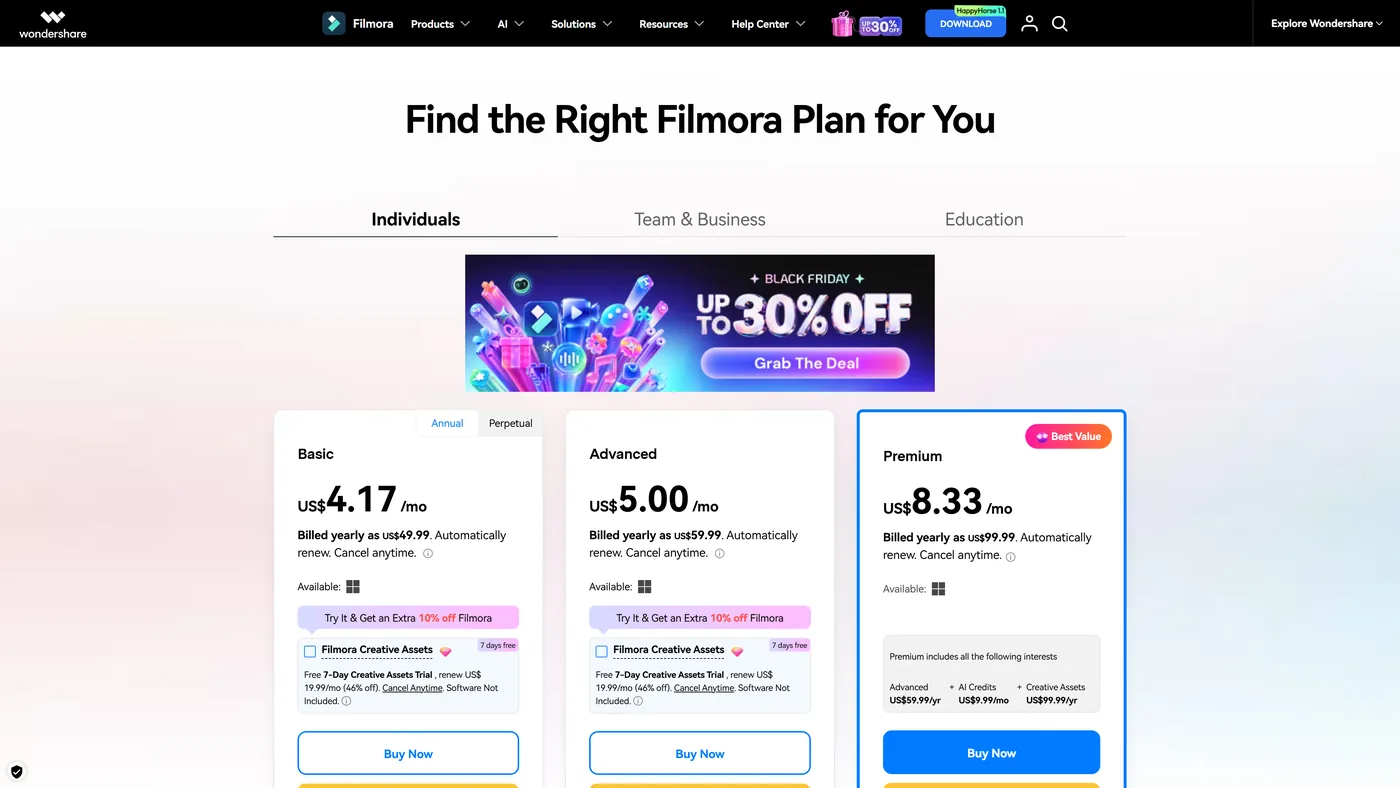
Wondershare's US plan page shows Black Friday deals right now. Premium is listed at $99.99 for the first year with a crossed-out $249.99. These prices change often, so check the live page before you pay.
Install Filmora, cut a real project, and only upgrade when you're ready to export without the watermark.
What can you do with Filmora?
Here's what comes in the editor itself, according to Wondershare's Filmora 16 page. Every item below is in the desktop app, not a separate download. Receipt · Wondershare Filmora 16 home pageFilmora 16 features: AI Media Analysis, screen recorder, rough cut, Camera Tracking, Color Mask, captions, 360 reframing, multi-version exportRead Nov 27, 2026Open source ↗
- Timeline editing with a magnetic timeline, keyframes, multi-camera editing and a Pen Tool for custom motion paths Receipt · Wondershare Filmora individual plans (US)Plan prices in USD, perpetual license, AI credits, watermark on free version, add-on prices, 30-day money-back policy, license and credit FAQRead Nov 27, 2026Open source ↗
- Rough-cut tools: remove pauses, edit from the transcript, trim clips fast Receipt · Wondershare Filmora 16 home pageFilmora 16 features: AI Media Analysis, screen recorder, rough cut, Camera Tracking, Color Mask, captions, 360 reframing, multi-version exportRead Nov 27, 2026Open source ↗
- Screen recorder that captures screen, webcam, mic and system audio as separate tracks you can edit one by one Receipt · Wondershare Filmora 16 home pageFilmora 16 features: AI Media Analysis, screen recorder, rough cut, Camera Tracking, Color Mask, captions, 360 reframing, multi-version exportRead Nov 27, 2026Open source ↗
- Auto captions: speech turned into subtitles on their own track, with suggested corrections and animated caption styles Receipt · Wondershare Filmora 16 home pageFilmora 16 features: AI Media Analysis, screen recorder, rough cut, Camera Tracking, Color Mask, captions, 360 reframing, multi-version exportRead Nov 27, 2026Open source ↗
- Audio tools: text-to-speech voiceovers, voice enhancer, background noise removal, silence detection, auto beat sync and audio ducking Receipt · Wondershare Filmora 16 home pageFilmora 16 features: AI Media Analysis, screen recorder, rough cut, Camera Tracking, Color Mask, captions, 360 reframing, multi-version exportRead Nov 27, 2026Open source ↗
- Color: quick correction, HSL, curves, 3D LUTs and a Color Mask to fix one area, like a face or a sky Receipt · Wondershare Filmora individual plans (US)Plan prices in USD, perpetual license, AI credits, watermark on free version, add-on prices, 30-day money-back policy, license and credit FAQRead Nov 27, 2026Open source ↗
- Tracking: motion tracking, planar tracking and the new Camera Tracking, so text or a logo sticks to a moving object Receipt · Wondershare Filmora 16 home pageFilmora 16 features: AI Media Analysis, screen recorder, rough cut, Camera Tracking, Color Mask, captions, 360 reframing, multi-version exportRead Nov 27, 2026Open source ↗
- Cleanup: stabilization, AI video enhancer, lens correction and flicker removal Receipt · Wondershare Filmora 16 home pageFilmora 16 features: AI Media Analysis, screen recorder, rough cut, Camera Tracking, Color Mask, captions, 360 reframing, multi-version exportRead Nov 27, 2026Open source ↗
- Multi-version export: reframe for vertical, translate, and export several versions from the same project Receipt · Wondershare Filmora 16 home pageFilmora 16 features: AI Media Analysis, screen recorder, rough cut, Camera Tracking, Color Mask, captions, 360 reframing, multi-version exportRead Nov 27, 2026Open source ↗
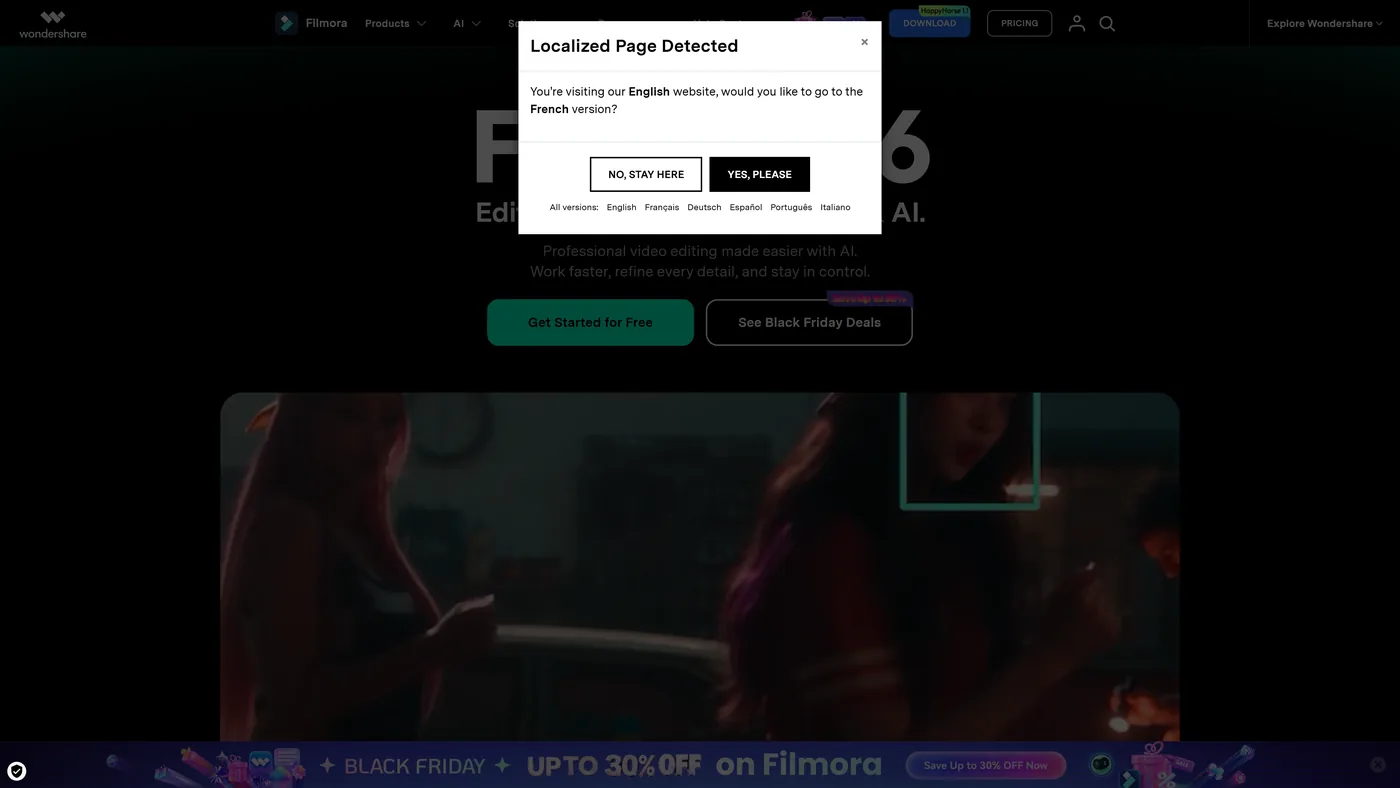
If you run a YouTube channel, the three that save the most time are silence detection (cuts the dead air out of a talking-head video), auto captions and Smart Short Clips, which pulls vertical clips out of a long video with music and subtitles already on. Our guide on how to start a YouTube channel shows where editing fits in your first month. Receipt · Wondershare Filmora individual plans (US)Plan prices in USD, perpetual license, AI credits, watermark on free version, add-on prices, 30-day money-back policy, license and credit FAQRead Nov 27, 2026Open source ↗
How much does Filmora cost?
Four ways in: free, three yearly plans, or a one-time license. Prices below are the US dollar prices on Wondershare's individual plan page, read on November 27, 2026. They're the Windows prices; the Mac version can cost a little more, and a license only works on the platform you buy it for. Receipt · Wondershare Filmora individual plans (US)Plan prices in USD, perpetual license, AI credits, watermark on free version, add-on prices, 30-day money-back policy, license and credit FAQRead Nov 27, 2026Open source ↗
Beginners who mainly cut, caption and export
- No watermark
- 4K HD export
- 100+ advanced editing features
- 1 GB cloud storage
- 500 AI Mate conversations a month
- All version upgrades while subscribed
Creators who want the AI tools: text to video, AI music, AI images
- Everything in Basic
- 1,000 AI credits a month
- Access to 20+ AI features
- 10 GB cloud storage
Weekly uploaders who use stock music, effects and templates
- Everything in Advanced
- 2,000 AI credits a month
- Full Creative Assets library included
- 100 GB cloud storage
People who hate subscriptions and don't need every new release
- Pay once, keep that version
- Updates within Filmora 16
- No watermark, 4K export
- 1,000 AI credits, one time
- 1 GB cloud storage
| Free | Basic | Advanced | Premium | |
|---|---|---|---|---|
| Price | $0 | $49.99/yr | $59.99/yr | $99.99/yr |
| Watermark on export | Yes | No | No | No |
| AI credits | None | None | 1,000/month | 2,000/month |
| AI Mate assistant | 15 uses/day | 500/month | 500/month | 500/month |
| Cloud storage | None | 1 GB | 10 GB | 100 GB |
| Music tracks | 9,600+ | 45K+ | 45K+ | 45K+ |
| Stock media | 600+ | 1.1M+ | 1.1M+ | 1.1M+ |
| Version upgrades | - | Included | Included | Included |
Receipt · Wondershare Filmora individual plans (US)Plan prices in USD, perpetual license, AI credits, watermark on free version, add-on prices, 30-day money-back policy, license and credit FAQRead Nov 27, 2026Open source ↗
The add-ons are where buyers get surprised. The Creative Assets pack (premium music, effects, stock footage, templates) is sold separately on Basic and Advanced, with a 7-day free trial that renews at $19.99 a month if you don't cancel it. Premium already includes it, which is why it's the plan Wondershare labels Best Value. Extra AI credits are sold at $9.99 a month. Receipt · Wondershare Filmora individual plans (US)Plan prices in USD, perpetual license, AI credits, watermark on free version, add-on prices, 30-day money-back policy, license and credit FAQRead Nov 27, 2026Open source ↗
Starting a channel? Basic. It removes the watermark and gives you every editing tool. Move to Advanced only when you catch yourself wanting AI music or text-to-video. If you'd use the stock library every week, Premium costs less than Advanced plus the Creative Assets trial left running.
Filmora perpetual license or annual plan: which one?
The perpetual license is $79.99 once on Windows. You keep Filmora 16 for good, with every bug-fix update to that version. What you don't get is the next major version: when Filmora 17 comes out, you pay an upgrade fee to move to it. You also get 1,000 AI credits one time, not every month. Receipt · Wondershare Filmora individual plans (US)Plan prices in USD, perpetual license, AI credits, watermark on free version, add-on prices, 30-day money-back policy, license and credit FAQRead Nov 27, 2026Open source ↗
The yearly plans include every update and every major upgrade while you're subscribed. They renew automatically, and you can cancel the renewal any time. Receipt · Wondershare Filmora individual plans (US)Plan prices in USD, perpetual license, AI credits, watermark on free version, add-on prices, 30-day money-back policy, license and credit FAQRead Nov 27, 2026Open source ↗
| Perpetual | Basic annual | |
|---|---|---|
| Price | $79.99 once | $49.99 a year |
| Next major version | Paid upgrade | Included |
| Watermark-free 4K export | Yes | Yes |
| AI credits | 1,000 one time | None |
| Break-even | Cheaper from year 2 | Cheaper in year 1 |
Receipt · Wondershare Filmora individual plans (US)Plan prices in USD, perpetual license, AI credits, watermark on free version, add-on prices, 30-day money-back policy, license and credit FAQRead Nov 27, 2026Open source ↗
Our take: if you'll still be editing in two years and don't care about the newest AI features, the perpetual license pays for itself in its second year. If you want each new release the day it ships, stay on a yearly plan.
How do Filmora AI credits work?
Many of Filmora's generative tools, like text to video, image to video, AI copywriting, video extend and flicker removal, are paid with AI credits. Basic has none, Advanced gives 1,000 a month and Premium 2,000. Receipt · Wondershare Filmora individual plans (US)Plan prices in USD, perpetual license, AI credits, watermark on free version, add-on prices, 30-day money-back policy, license and credit FAQRead Nov 27, 2026Open source ↗
- Credits arrive every 30 days from your purchase date. Receipt · Wondershare Filmora individual plans (US)Plan prices in USD, perpetual license, AI credits, watermark on free version, add-on prices, 30-day money-back policy, license and credit FAQRead Nov 27, 2026Open source ↗
- Unused credits don't roll over: they're reclaimed when the new batch lands. Receipt · Wondershare Filmora individual plans (US)Plan prices in USD, perpetual license, AI credits, watermark on free version, add-on prices, 30-day money-back policy, license and credit FAQRead Nov 27, 2026Open source ↗
- Credits are shared across Windows and Mac on the same Wondershare account. Receipt · Wondershare Filmora individual plans (US)Plan prices in USD, perpetual license, AI credits, watermark on free version, add-on prices, 30-day money-back policy, license and credit FAQRead Nov 27, 2026Open source ↗
- Some AI tools cost nothing on paid plans: Smart Search, Auto Reframe, AI Face Mosaic, AI Portrait and AI Color Palette. Receipt · Wondershare Filmora individual plans (US)Plan prices in USD, perpetual license, AI credits, watermark on free version, add-on prices, 30-day money-back policy, license and credit FAQRead Nov 27, 2026Open source ↗
Plain advice: use your monthly credits before the 30 days are up, and don't buy Advanced for AI you haven't tried yet. The free version and Basic let you learn the editor first.
How do you get started with Filmora?
-
1
Download the free version
Pick Windows or Mac on Wondershare's site and install. You sign in with a Wondershare ID to activate it. Receipt · Wondershare Filmora individual plans (US)Plan prices in USD, perpetual license, AI credits, watermark on free version, add-on prices, 30-day money-back policy, license and credit FAQRead Nov 27, 2026Open source ↗
-
2
Edit one real video
Import your footage, run silence detection, add auto captions and a music track. You'll know in an hour if the editor clicks for you. Receipt · Wondershare Filmora 16 home pageFilmora 16 features: AI Media Analysis, screen recorder, rough cut, Camera Tracking, Color Mask, captions, 360 reframing, multi-version exportRead Nov 27, 2026Open source ↗
-
3
Export a test
The free export carries a watermark. That's fine for a test: check the quality and the speed on your computer. Receipt · Wondershare Filmora individual plans (US)Plan prices in USD, perpetual license, AI credits, watermark on free version, add-on prices, 30-day money-back policy, license and credit FAQRead Nov 27, 2026Open source ↗
-
4
Pick your plan
Basic to remove the watermark, Advanced or Premium if you want AI credits, perpetual if you'd rather pay once. Buy for the platform you edit on: licenses don't transfer between Windows and Mac. Receipt · Wondershare Filmora individual plans (US)Plan prices in USD, perpetual license, AI credits, watermark on free version, add-on prices, 30-day money-back policy, license and credit FAQRead Nov 27, 2026Open source ↗
-
5
Watch the add-on trials
If you start the Creative Assets trial, set a reminder for day 7. It renews at $19.99 a month unless you cancel. Receipt · Wondershare Filmora individual plans (US)Plan prices in USD, perpetual license, AI credits, watermark on free version, add-on prices, 30-day money-back policy, license and credit FAQRead Nov 27, 2026Open source ↗
From $49.99 a year, or $79.99 once. 30-day money-back window.
Is Filmora trustworthy? What users say
Filmora is made by Wondershare, a software company that also sells PDFelement, Recoverit and UniConverter. It's a real, long-running product with a 30-day money-back window and live chat support. Receipt · Wondershare Filmora individual plans (US)Plan prices in USD, perpetual license, AI credits, watermark on free version, add-on prices, 30-day money-back policy, license and credit FAQRead Nov 27, 2026Open source ↗
On Trustpilot, Filmora holds 4.0 out of 5 from 15,743 reviews (read November 26, 2026). The praise is almost always about ease of use. The complaints are about billing: people who missed an auto-renewal or a trial that turned paid. Receipt · Wondershare Filmora on Trustpilot4.0/5 from 15,743 reviews, user reviews, review themesRead Nov 27, 2026Open source ↗
A verified reviewer said they record their screen and edit phone videos in Filmora, and that the simple tools make it a good fit for beginners.
Trustpilot reviewer, May 2026 Receipt · Wondershare Filmora on Trustpilot4.0/5 from 15,743 reviews, user reviews, review themesRead Nov 27, 2026Open source ↗
Another called it one of the best products of its kind, easy to use with plenty of features, and said regular updates keep it their editor of choice.
Trustpilot reviewer, Apr 2026 Receipt · Wondershare Filmora on Trustpilot4.0/5 from 15,743 reviews, user reviews, review themesRead Nov 27, 2026Open source ↗
The fix for the billing complaints is simple: turn off auto-renew in your Wondershare account right after you buy if you're not sure you'll keep it, and cancel any add-on trial you don't need before day 7.
Is Filmora better than CapCut or Canva?
Different jobs. CapCut started on phones and shines for quick vertical clips. Canva is a design tool with a video editor attached, great for slides and social posts. Filmora is a full desktop editor: multi-track timeline, keyframes, tracking, color grading and a screen recorder with separate tracks. If you're making 8 to 20 minute YouTube videos on a computer, Filmora gives you more control. Receipt · Wondershare Filmora 16 home pageFilmora 16 features: AI Media Analysis, screen recorder, rough cut, Camera Tracking, Color Mask, captions, 360 reframing, multi-version exportRead Nov 27, 2026Open source ↗
The closest rival in price and style is Movavi. We compare them in our Movavi Video Editor review, and the full field is in our roundup of the best video editors for YouTube.
Who should pick something else?
If you edit feature films, run a post-production team, or need advanced color pipelines, you'll want a pro tool like DaVinci Resolve or Premiere Pro instead. And if every video you make is a 30-second vertical clip shot on your phone, a mobile-first app may be all you need.
Filmora sits in the sweet spot: easy enough for your first edit, deep enough for a channel that grows. Learn it on the free version, buy Basic when you publish, and add AI credits only when you need them. If you hate subscriptions, the $79.99 perpetual license is one of the few pay-once options left.